
1 文档
2 前提
硬件
| Resource | Minimum | Recommended |
|---|---|---|
| CPU | 2CPU | 4CPU |
| Mem | 4G | 8G |
| Disk | 40G | 160G |
软件
| Resource | Minimum | Description |
|---|---|---|
| Docker Engine | Version 20.10.10-ce+ | Docker Engine documentation |
| Docker Compose | v1.18.0+ or docker compose v2 | Docker Compose documentation |
| OpenSSL | Latest is preferred | Used to generate certificate and keys for Harbor |
端口
| Port | protocol | Description |
|---|---|---|
| 443 | HTTPS | Harbor portal and core API accept HTTPS requests on this port. You can change this port in the configuration file. |
| 4443 | HTTPS | Connections to the Docker Content Trust service for Harbor. You can change this port in the configuration file. |
| 80 | HTTP | Harbor portal and core API accept HTTP requests on this port. You can change this port in the configuration file. |
下载
wget https://github.com/goharbor/harbor/releases/download/v2.11.1/harbor-offline-installer-v2.11.1.tgz
解压
# tar zxvf harbor-offline-installer-v2.11.1.tgz -C /opt/
harbor/harbor.v2.11.1.tar.gz
harbor/prepare
harbor/LICENSE
harbor/install.sh
harbor/common.sh
harbor/harbor.yml.tmpl
3 配置https访问
快速配置
下载 gen-certs.sh 脚本并执行。
4 配置Harbor
1、编辑harbor.yml配置文件
cd /opt/harbor
# 复制一份harbor的配置文件并改名harbor.yml
cp -ar harbor.yml.tmpl harbor.yml

# vim 编辑配置文件
vim harbor.yml
2、修改hostname,这里配置为监听地址,也可以是域名
...
# The IP address or hostname to access admin UI and registry service.
# DO NOT use localhost or 127.0.0.1, because Harbor needs to be accessed by external clients.
hostname: harbor.example.com
...
3、修改port
...
# http related config
http:
  # port for http, default is 80. If https enabled, this port will redirect to https port
  port: 10010
...
4、修改证书路径
# https related config
https:
  # https port for harbor, default is 443
  port: 10011
  # The path of cert and key files for nginx
  certificate: /your/certificate/path
  private_key: /your/private/key/path
  # enable strong ssl ciphers (default: false)
  # strong_ssl_ciphers: false
5、修改 harbor_admin_password ,配置 admin 用户的密码
# The initial password of Harbor admin
# It only works in first time to install harbor
# Remember Change the admin password from UI after launching Harbor.
harbor_admin_password: Your Password
注意 It only works in first time to install harbor 这句话,是说设置的密码仅在第一次安装 Harbor 时生效,之后再重新销毁容器,重新设置密码,重新部署都将不会生效。但是可以进入 Harbor 在页面中修改 admin 用户的密码。
6、修改 data_volume,设置数据仓库
...
# The default data volume
data_volume: /data/harbor
...
5 安装
1、命令
# Harbor安装环境预处理
./prepare
# 安装并启动Harbor
./install.sh
# 检查是否安装成功(应该是启动9个容器)要在harbor目录下操作,否则docker-compose会又问题;
docker-compose ps
2、prepare 完整过程
# ./prepare
prepare base dir is set to /opt/harbor
Unable to find image 'goharbor/prepare:v2.11.1' locally
v2.11.1: Pulling from goharbor/prepare
21fde6fe7256: Pull complete
e7d411dc7b71: Pull complete
956686c6154d: Pull complete
ccc241b37d9f: Pull complete
3987a6241b04: Pull complete
e5d1bb106ead: Pull complete
ab6fb87032e7: Pull complete
b4af08cd7f0c: Pull complete
55da78465c7e: Pull complete
cccf92d2dec0: Pull complete
Digest: sha256:35dbf7b4293e901e359dbf065ed91d9e4a0de371898da91a3b92c3594030a88c
Status: Downloaded newer image for goharbor/prepare:v2.11.1
Generated configuration file: /config/portal/nginx.conf
Generated configuration file: /config/log/logrotate.conf
Generated configuration file: /config/log/rsyslog_docker.conf
Generated configuration file: /config/nginx/nginx.conf
Generated configuration file: /config/core/env
Generated configuration file: /config/core/app.conf
Generated configuration file: /config/registry/config.yml
Generated configuration file: /config/registryctl/env
Generated configuration file: /config/registryctl/config.yml
Generated configuration file: /config/db/env
Generated configuration file: /config/jobservice/env
Generated configuration file: /config/jobservice/config.yml
Generated and saved secret to file: /data/secret/keys/secretkey
Successfully called func: create_root_cert
Generated configuration file: /compose_location/docker-compose.yml
Clean up the input dir
#
# docker images
REPOSITORY                              TAG           IMAGE ID       CREATED         SIZE
goharbor/prepare                        v2.11.1       1d00ffdb2e67   2 months ago    216MB
3、install完整过程(可忽略)
# ./install.sh

[Step 0]: checking if docker is installed ...

Note: docker version: 26.1.4

[Step 1]: checking docker-compose is installed ...

Note: Docker Compose version v2.27.1

[Step 2]: loading Harbor images ...
Loaded image: goharbor/prepare:v2.11.1
59cd002b46d2: Loading layer [==================================================>]  21.86MB/21.86MB
2e8f9fa1e5f5: Loading layer [==================================================>]    175MB/175MB
ecd34246c904: Loading layer [==================================================>]  26.04MB/26.04MB
d8b960cafd25: Loading layer [==================================================>]  18.54MB/18.54MB
410dc4347a57: Loading layer [==================================================>]   5.12kB/5.12kB
80921caabb24: Loading layer [==================================================>]  6.144kB/6.144kB
e91542fda4dd: Loading layer [==================================================>]  3.072kB/3.072kB
df3f2e9dd439: Loading layer [==================================================>]  2.048kB/2.048kB
d8facbd2a6c0: Loading layer [==================================================>]   2.56kB/2.56kB
4715dde7127c: Loading layer [==================================================>]   7.68kB/7.68kB
Loaded image: goharbor/harbor-db:v2.11.1
926647c50af4: Loading layer [==================================================>]  17.23MB/17.23MB
99ff9f9dc8ce: Loading layer [==================================================>]  28.75MB/28.75MB
99078c9b3a60: Loading layer [==================================================>]  4.608kB/4.608kB
fe5588cde585: Loading layer [==================================================>]  29.54MB/29.54MB
Loaded image: goharbor/harbor-exporter:v2.11.1
4ec814cdc7b2: Loading layer [==================================================>]  21.86MB/21.86MB
235f2878bf8a: Loading layer [==================================================>]  110.5MB/110.5MB
cdccfb99123c: Loading layer [==================================================>]  3.072kB/3.072kB
c7ea796bb849: Loading layer [==================================================>]   59.9kB/59.9kB
f8a27040ef0d: Loading layer [==================================================>]  61.95kB/61.95kB
Loaded image: goharbor/redis-photon:v2.11.1
7a130cf406bb: Loading layer [==================================================>]  121.1MB/121.1MB
Loaded image: goharbor/nginx-photon:v2.11.1
7786af5594f6: Loading layer [==================================================>]  121.1MB/121.1MB
0c39daf00027: Loading layer [==================================================>]  6.703MB/6.703MB
c9af590a487f: Loading layer [==================================================>]  251.9kB/251.9kB
9ba79732c750: Loading layer [==================================================>]  1.477MB/1.477MB
Loaded image: goharbor/harbor-portal:v2.11.1
2124fec7bf7d: Loading layer [==================================================>]  17.23MB/17.23MB
257165566506: Loading layer [==================================================>]  3.584kB/3.584kB
71c6cf01ef4c: Loading layer [==================================================>]   2.56kB/2.56kB
e6aaf52bc017: Loading layer [==================================================>]  67.13MB/67.13MB
ac2b2a90f17c: Loading layer [==================================================>]  5.632kB/5.632kB
2deff795bee3: Loading layer [==================================================>]  125.4kB/125.4kB
e4bd545de86d: Loading layer [==================================================>]  201.7kB/201.7kB
847012124c72: Loading layer [==================================================>]  68.25MB/68.25MB
d1601b055891: Loading layer [==================================================>]   2.56kB/2.56kB
Loaded image: goharbor/harbor-core:v2.11.1
e4f7bca07127: Loading layer [==================================================>]  130.8MB/130.8MB
3d744fdec5a0: Loading layer [==================================================>]  3.584kB/3.584kB
e2c98f9cef30: Loading layer [==================================================>]  3.072kB/3.072kB
cbe22372d70a: Loading layer [==================================================>]   2.56kB/2.56kB
c3cc060f064c: Loading layer [==================================================>]  3.072kB/3.072kB
184ad5ccf4f4: Loading layer [==================================================>]  3.584kB/3.584kB
4a30d6215ed7: Loading layer [==================================================>]  20.48kB/20.48kB
Loaded image: goharbor/harbor-log:v2.11.1
d2e836032dca: Loading layer [==================================================>]  17.23MB/17.23MB
6159b9476a38: Loading layer [==================================================>]  3.584kB/3.584kB
6cd40121c7f9: Loading layer [==================================================>]   2.56kB/2.56kB
ab578d976e3e: Loading layer [==================================================>]  54.27MB/54.27MB
74d4b342c232: Loading layer [==================================================>]  55.06MB/55.06MB
Loaded image: goharbor/harbor-jobservice:v2.11.1
a370043a2cd6: Loading layer [==================================================>]  14.22MB/14.22MB
068c345c0269: Loading layer [==================================================>]  4.096kB/4.096kB
24607b1b1b88: Loading layer [==================================================>]  17.86MB/17.86MB
d460b7320fa0: Loading layer [==================================================>]  3.072kB/3.072kB
41f6293d43da: Loading layer [==================================================>]  38.93MB/38.93MB
47c258cefc9f: Loading layer [==================================================>]  57.57MB/57.57MB
Loaded image: goharbor/harbor-registryctl:v2.11.1
b020161dfc96: Loading layer [==================================================>]  14.22MB/14.22MB
660cc2bb7fc2: Loading layer [==================================================>]  4.096kB/4.096kB
093817c1779d: Loading layer [==================================================>]  3.072kB/3.072kB
baa5b276e894: Loading layer [==================================================>]  17.86MB/17.86MB
4db5e5303fdc: Loading layer [==================================================>]  18.65MB/18.65MB
Loaded image: goharbor/registry-photon:v2.11.1
cf045d0bacdb: Loading layer [==================================================>]  14.73MB/14.73MB
7b3be75d25ec: Loading layer [==================================================>]  4.096kB/4.096kB
300144cef16c: Loading layer [==================================================>]  3.072kB/3.072kB
20b0983274b3: Loading layer [==================================================>]  127.1MB/127.1MB
c64d3b51f3b9: Loading layer [==================================================>]  14.89MB/14.89MB
ecf40289f004: Loading layer [==================================================>]  142.7MB/142.7MB
Loaded image: goharbor/trivy-adapter-photon:v2.11.1


[Step 3]: preparing environment ...

[Step 4]: preparing harbor configs ...
prepare base dir is set to /opt/harbor
Clearing the configuration file: /config/log/logrotate.conf
Clearing the configuration file: /config/log/rsyslog_docker.conf
Clearing the configuration file: /config/db/env
Clearing the configuration file: /config/registry/passwd
Clearing the configuration file: /config/registry/config.yml
Clearing the configuration file: /config/jobservice/config.yml
Clearing the configuration file: /config/jobservice/env
Clearing the configuration file: /config/core/app.conf
Clearing the configuration file: /config/core/env
Clearing the configuration file: /config/portal/nginx.conf
Clearing the configuration file: /config/registryctl/config.yml
Clearing the configuration file: /config/registryctl/env
Clearing the configuration file: /config/nginx/nginx.conf
Generated configuration file: /config/portal/nginx.conf
Generated configuration file: /config/log/logrotate.conf
Generated configuration file: /config/log/rsyslog_docker.conf
Generated configuration file: /config/nginx/nginx.conf
Generated configuration file: /config/core/env
Generated configuration file: /config/core/app.conf
Generated configuration file: /config/registry/config.yml
Generated configuration file: /config/registryctl/env
Generated configuration file: /config/registryctl/config.yml
Generated configuration file: /config/db/env
Generated configuration file: /config/jobservice/env
Generated configuration file: /config/jobservice/config.yml
loaded secret from file: /data/secret/keys/secretkey
Generated configuration file: /compose_location/docker-compose.yml
Clean up the input dir


Note: stopping existing Harbor instance ...
WARN[0000] /opt/harbor/docker-compose.yml: `version` is obsolete


[Step 5]: starting Harbor ...
WARN[0000] /opt/harbor/docker-compose.yml: `version` is obsolete
[+] Running 10/10
 ✔ Network harbor_harbor        Created                                                                                     0.0s
 ✔ Container harbor-log         Started                                                                                     0.7s
 ✔ Container registryctl        Started                                                                                     1.0s
 ✔ Container redis              Started                                                                                     1.1s
 ✔ Container harbor-portal      Started                                                                                     1.0s
 ✔ Container harbor-db          Started                                                                                     1.0s
 ✔ Container registry           Started                                                                                     0.9s
 ✔ Container harbor-core        Started                                                                                     1.1s
 ✔ Container nginx              Started                                                                                     1.4s
 ✔ Container harbor-jobservice  Started                                                                                     1.3s
✔ ----Harbor has been installed and started successfully.----
4、查看创建的容器
# docker ps -a
CONTAINER ID   IMAGE                                 COMMAND                  CREATED          STATUS                    PORTS                                                                                      NAMES
9072efa92472   goharbor/harbor-jobservice:v2.11.1    "/harbor/entrypoint.…"   55 seconds ago   Up 48 seconds (healthy)                                                                                              harbor-jobservice
42890eabf4a3   goharbor/nginx-photon:v2.11.1         "nginx -g 'daemon of…"   55 seconds ago   Up 53 seconds (healthy)   0.0.0.0:10010->8080/tcp, :::10010->8080/tcp, 0.0.0.0:10011->8443/tcp, :::10011->8443/tcp   nginx
8e89846abd9c   goharbor/harbor-core:v2.11.1          "/harbor/entrypoint.…"   55 seconds ago   Up 53 seconds (healthy)                                                                                              harbor-core
cb9c5bb952e1   goharbor/harbor-db:v2.11.1            "/docker-entrypoint.…"   55 seconds ago   Up 53 seconds (healthy)                                                                                              harbor-db
4b3cc9e22d0f   goharbor/harbor-portal:v2.11.1        "nginx -g 'daemon of…"   55 seconds ago   Up 53 seconds (healthy)                                                                                              harbor-portal
17d0c6fc963e   goharbor/registry-photon:v2.11.1      "/home/harbor/entryp…"   55 seconds ago   Up 53 seconds (healthy)                                                                                              registry
84b0fdbd2cb2   goharbor/harbor-registryctl:v2.11.1   "/home/harbor/start.…"   55 seconds ago   Up 53 seconds (healthy)                                                                                              registryctl
5d32fc82a4a2   goharbor/redis-photon:v2.11.1         "redis-server /etc/r…"   55 seconds ago   Up 53 seconds (healthy)                                                                                              redis
9d9ec0f2e94a   goharbor/harbor-log:v2.11.1           "/bin/sh -c /usr/loc…"   55 seconds ago   Up 54 seconds (healthy)   127.0.0.1:1514->10514/tcp                                                                  harbor-log
6 访问页面
1、访问地址
- 配置文件中配置的 hostname和port
2、用户名和密码
- 用户名默认是
admin - 密码是配置文件配置的
harbor_admin_password
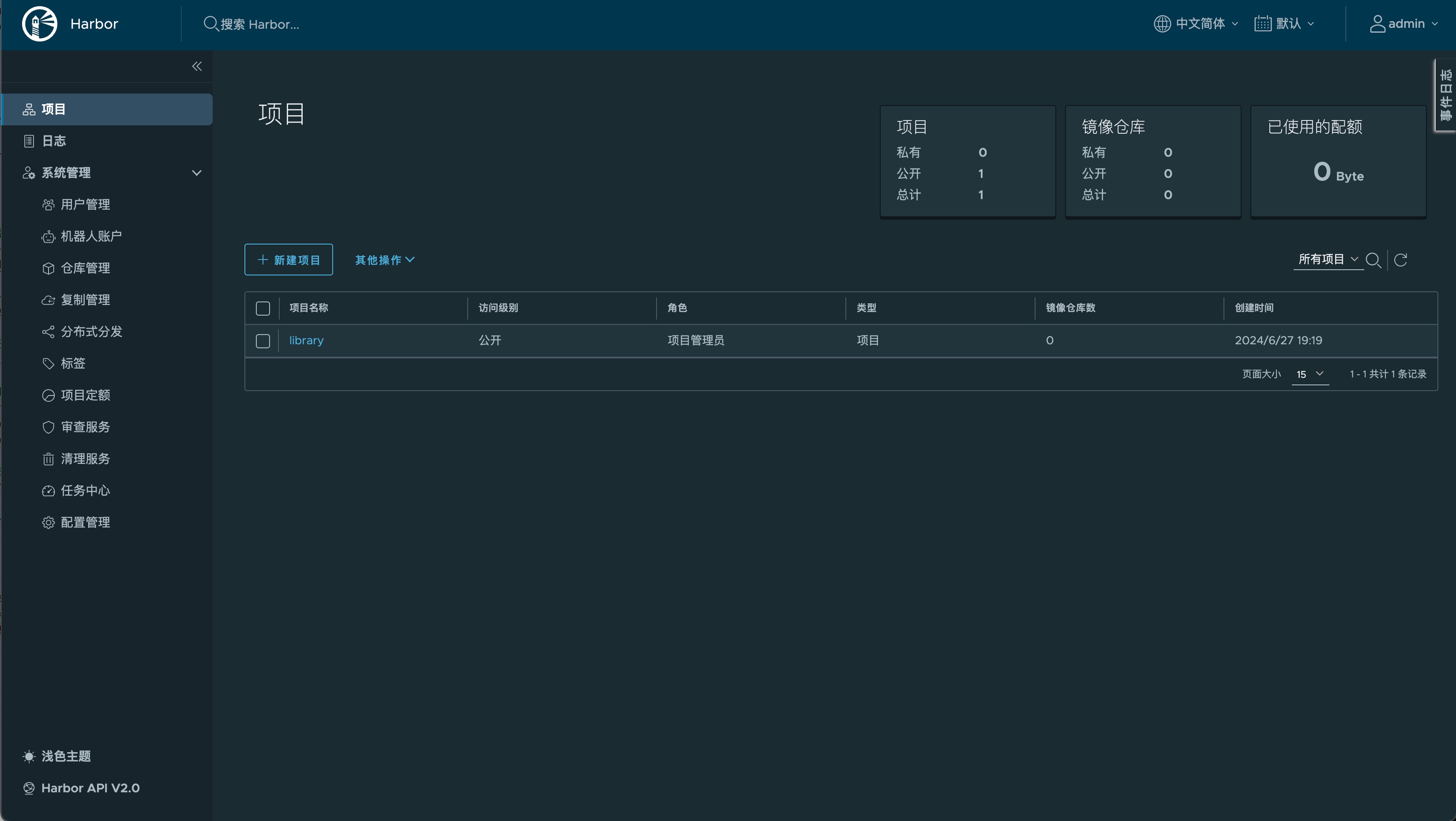
3、预览效果
7 修改Docker配置
1、参考
注意:
这里设置的是 Docker 客户端,也就是自己的电脑,因为如果不设置的话,在自己电脑上如登录、推送镜像等操作则会出现错误。
2、修改daemon.json
# 由于docker默认不允许使用非https方式推送镜像,所以在需要pull镜像的服务器配置访问地址
vim /etc/docker/daemon.json
配置如下
{
    ...
    "insecure-registries": [
        "harbor.example.com:10011"
    ]
}
3、重启docker
systemctl daemon-reload && service docker restart
8 使用
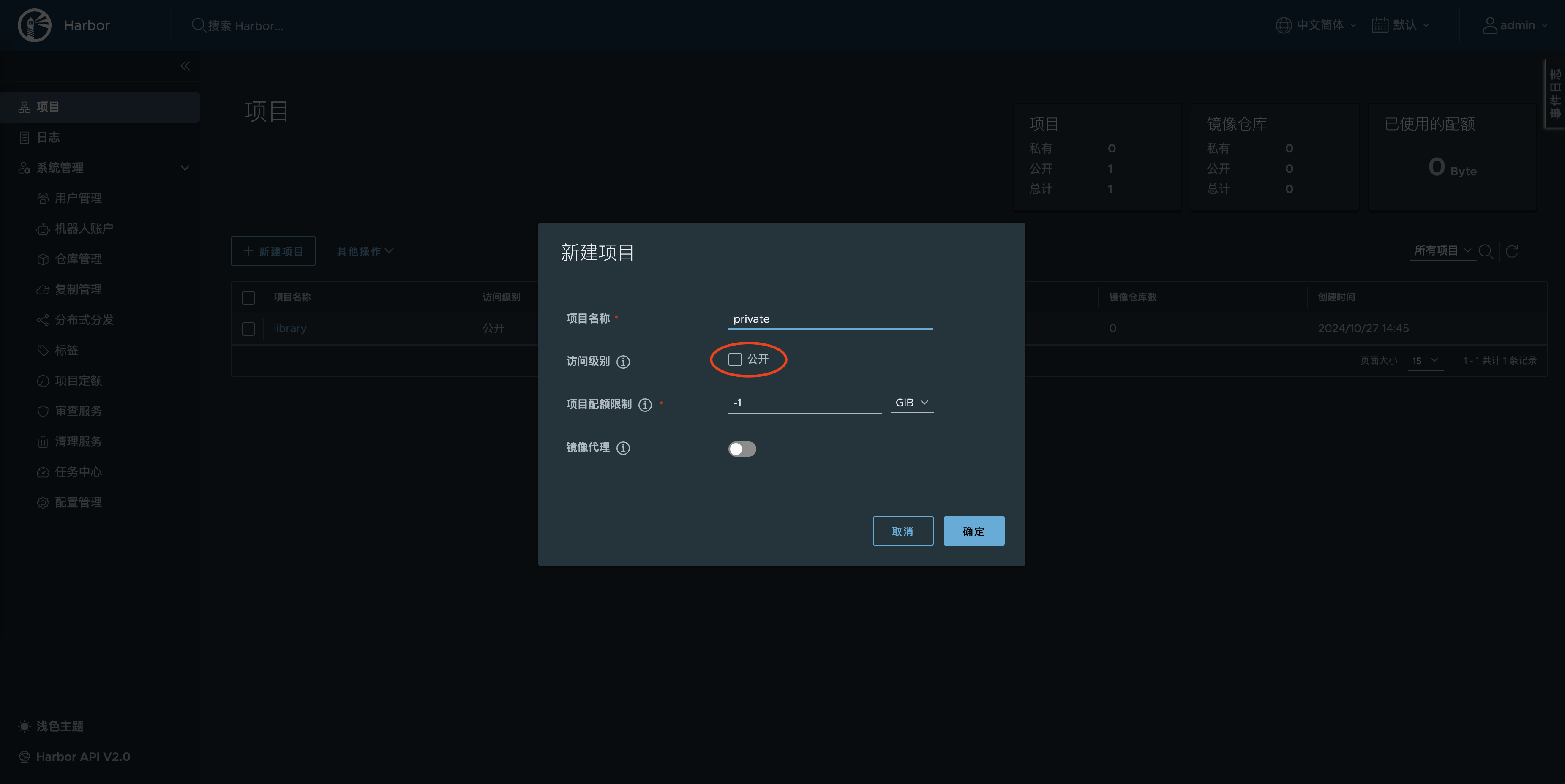
8.1 创建私有仓库
访问级别的 公开 选项不要勾选:
8.2 登录
# docker login harbor.example.com:10011
或者
# docker login -uadmin -pHaarbor12345 harbor.example.com:10011
发现均无法登录,提示下面的错误信息:
docker login harbor.example.com:10011
Authenticating with existing credentials...
Login did not succeed, error: Error response from daemon: Get "https://harbor.example.com:10011/v2/": tls: failed to verify certificate: x509: certificate signed by unknown authority
Username (admin): admin
Password:
Error response from daemon: Get "https://harbor.example.com:10011/v2/": tls: failed to verify certificate: x509: certificate signed by unknown authority
解决方案
1、登录服务器将 /etc/docker/certs.d 目录拷贝下来放到本地登录机器的 /etc/docker 目录下。我本地使用的是 Mac,是放在了 ~/.docker 目录下。
2、编辑 daemon.json 配置文件,添加以下内容,harbor.example.com 和 10011 是在 harbor.yml 配置的hostname和port。
{
  ...
  "insecure-registries": [
    "harbor.example.com:10011"
  ],
}
3、重启本地 Docker
4、重新登录
~ docker login harbor.example.com:10011
Username: admin
Password:
Login Succeeded
8.3 推送镜像
拉取测试镜像
# docker pull busybox
打标签
1、格式
docker tag 镜像名:版本 your-ip:端口/项目名称/新的镜像名:版本
2、注意 一定要加上项目名称
docker tag busybox:latest harbor.example.com:10011/private/busybox:latest
3、推送
docker push harbor.example.com:10011/private/busybox:latest
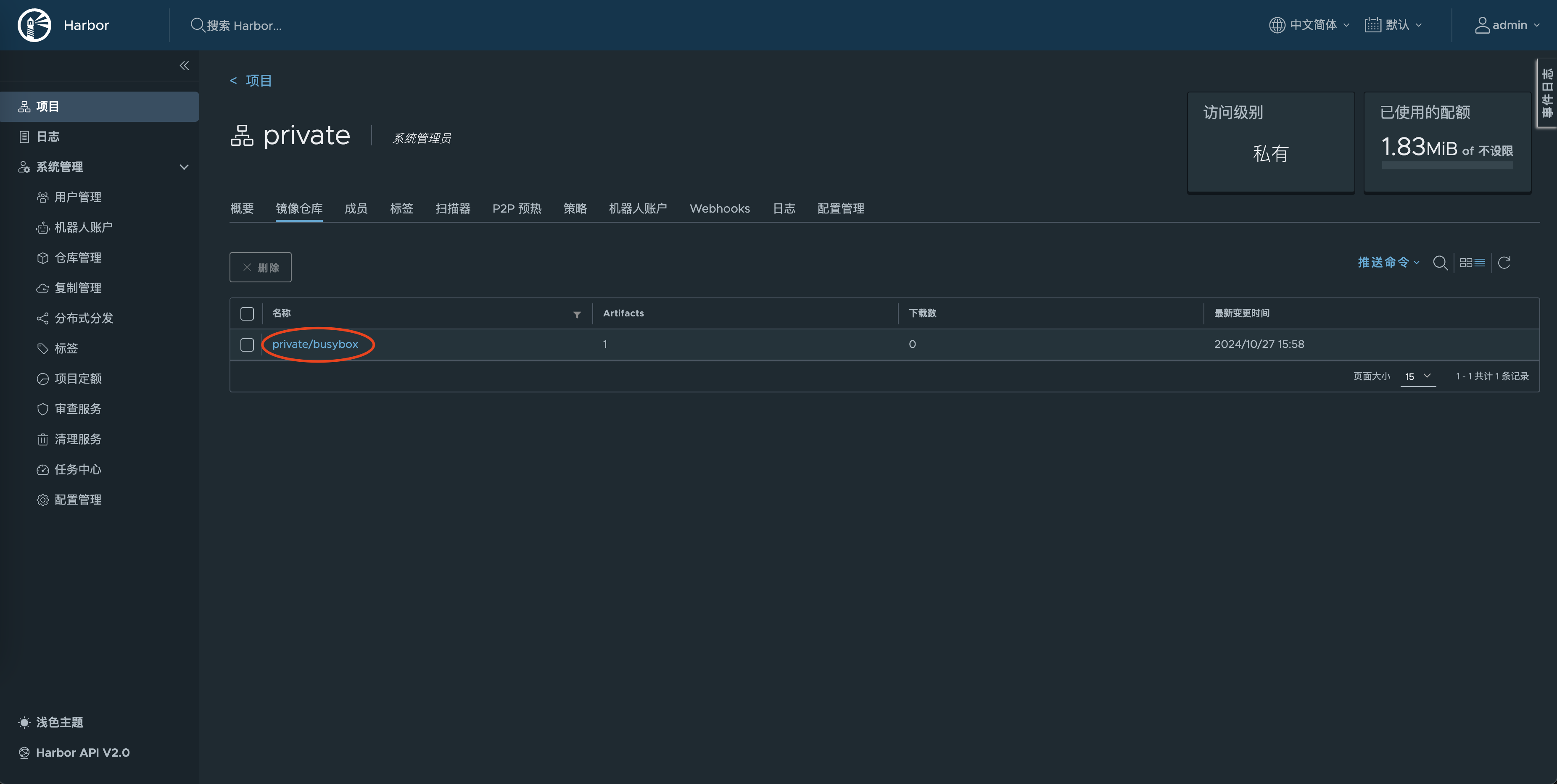
4、查看
8.4 拉取镜像
拉取方法一
1、点击小按钮复制命令
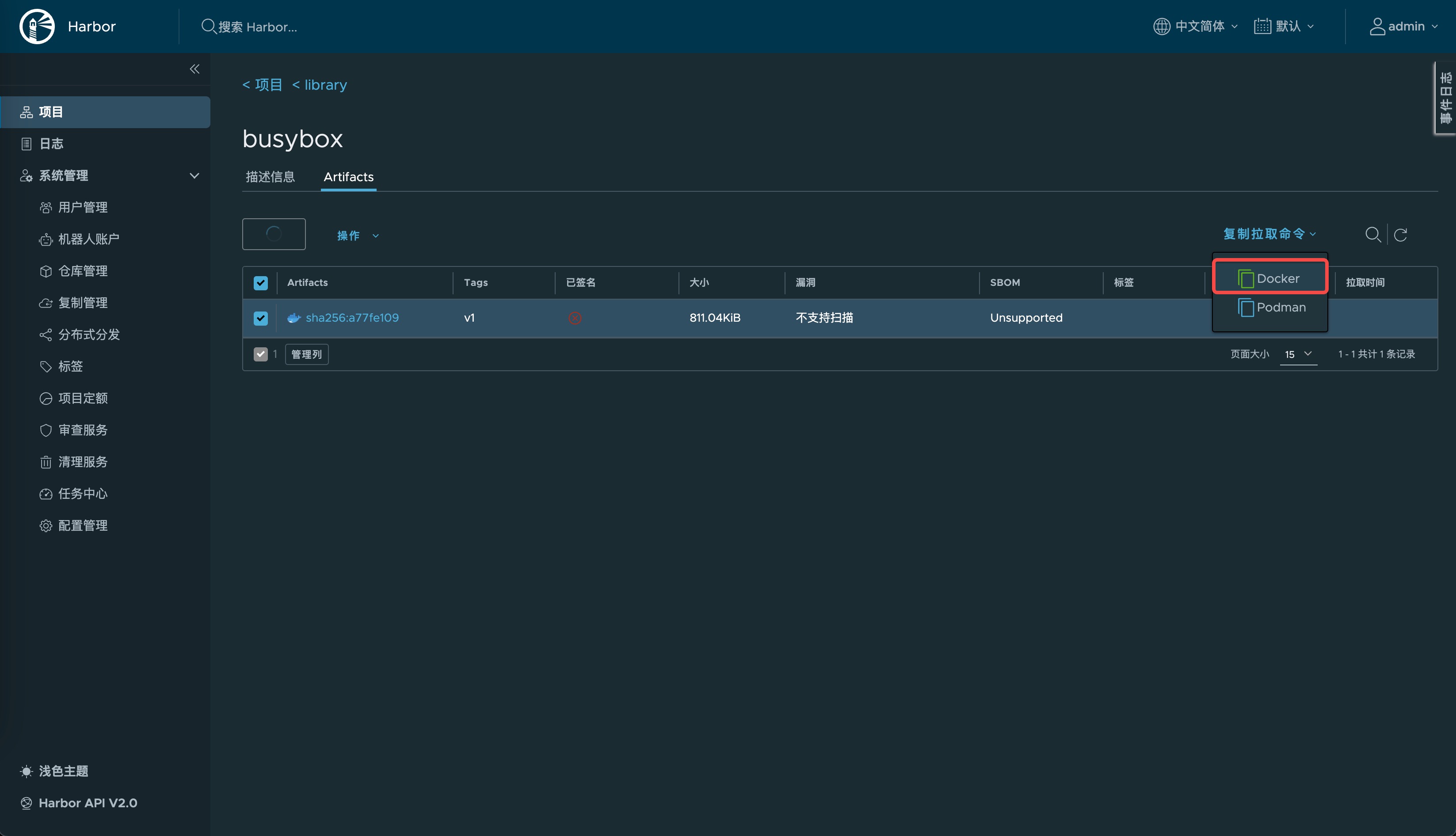
2、粘贴命令拉取
docker pull harbor.example.com:10011/private/busybox@sha256:cbfb4842eaea648ad3f0fa53bf27128563f09e1792ec754e0a1881e21780e88f
拉取方法二
1、格式
docker pull 上传时修改的镜像名
2、拉取
docker pull harbor.example.com:10011/private/busybox:latest
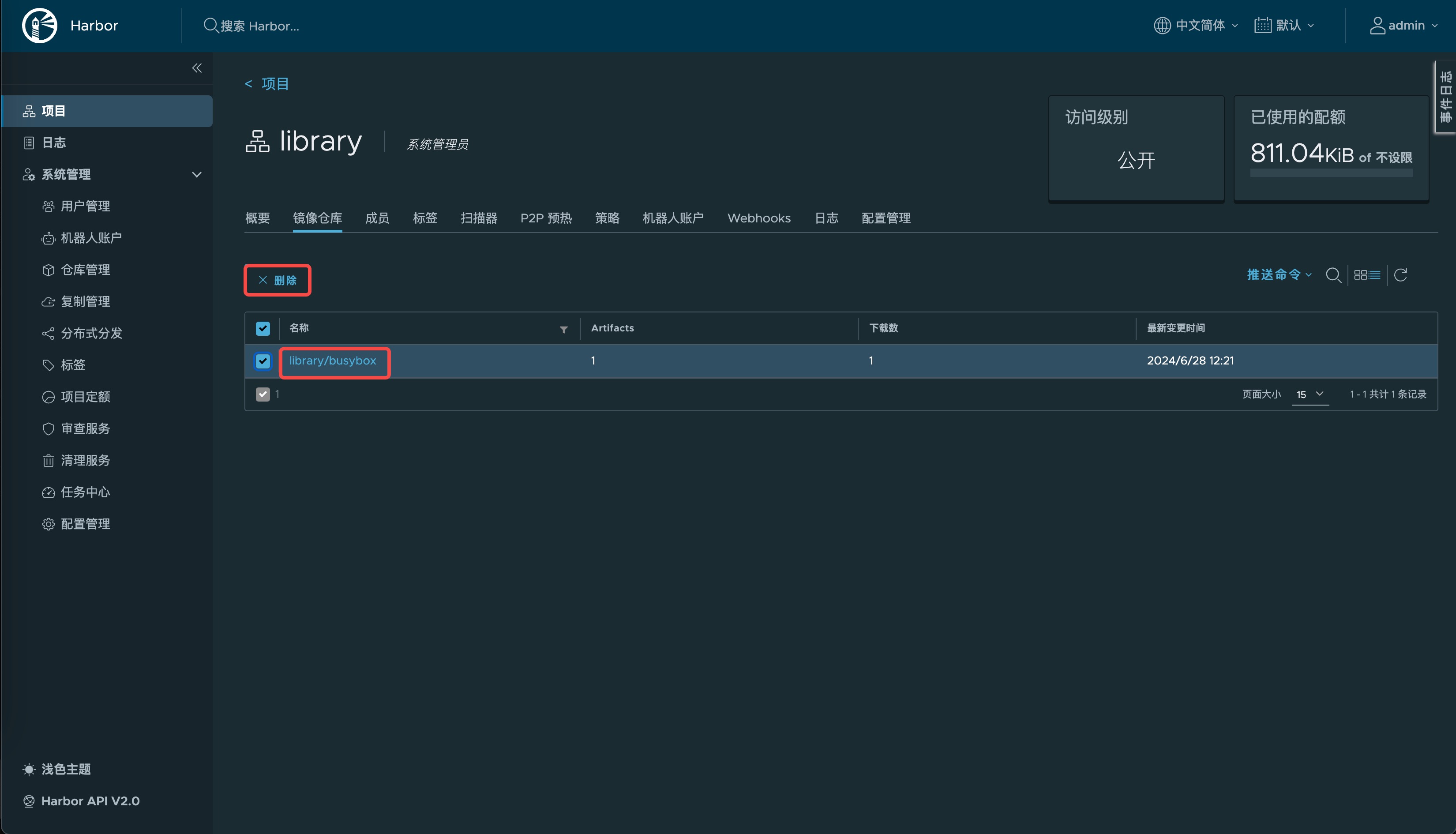
8.5 删除镜像
9 更新记录
-
2024.06.27 文档更新
- 使用 harbor v2.11.0 镜像中心。
-
2024.10.24 文档更新
- 完善环境搭建资源要求。
- 使用 harbor v2.11.1 镜像中心。
- 增加https访问配置。